Live viewer
After ./run.sh or .\run.ps1, open http://127.0.0.1:8000.
The Observer is a three-column workspace: Configure (left), Map (center), Chat & events (right). Hide either sidebar with ×, or use Config / Chat in the top bar.
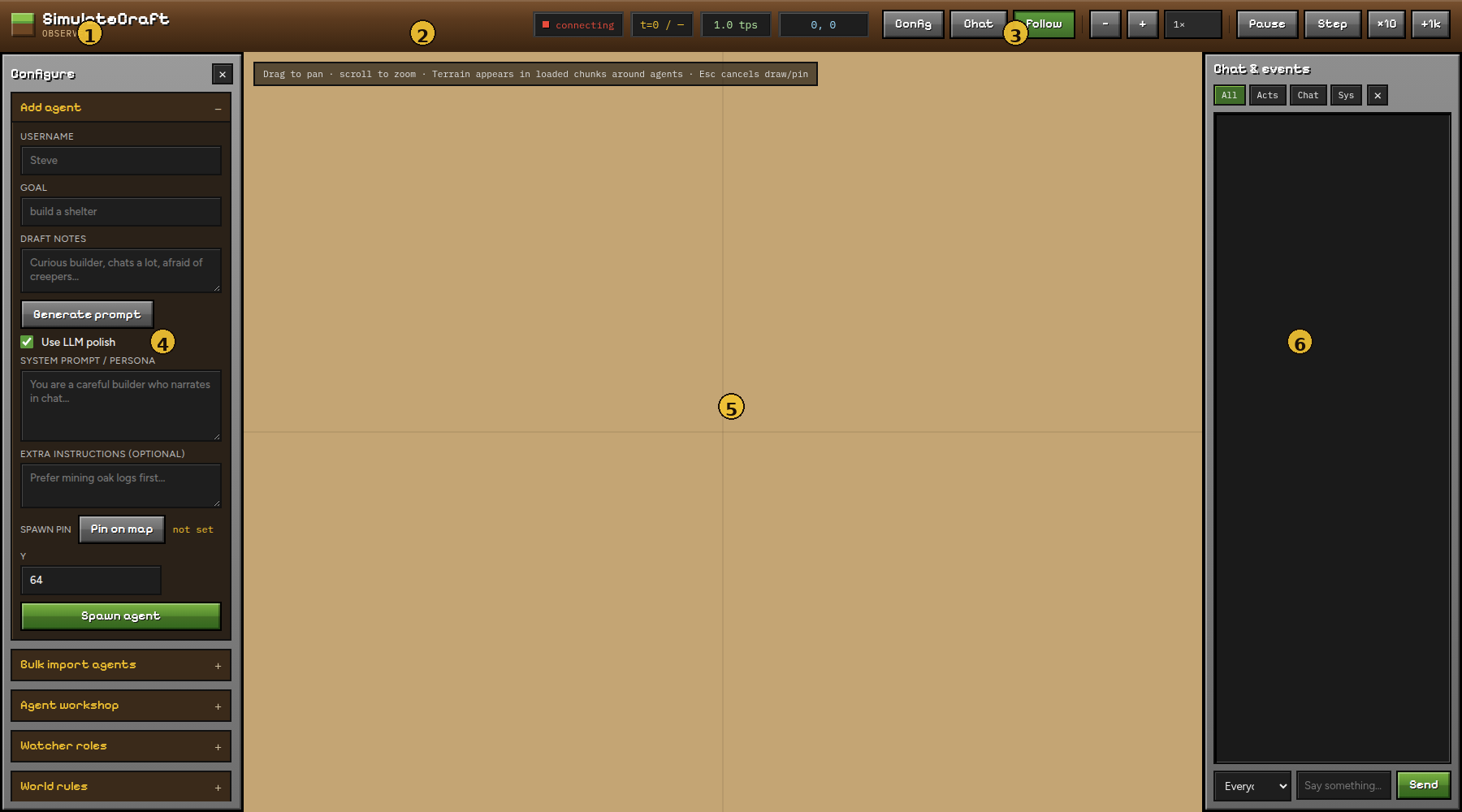
| # | Region | What it does |
|---|---|---|
| 1 | Brand | SimulateCraft Observer |
| 2 | Run meta | Connection status, tick counter, tick rate, map-center coords |
| 3 | Controls | Sidebar toggles, Follow, speed, Play/Pause/Step |
| 4 | Configure | Agents, workshop, watchers, world rules / boundaries / import, roster |
| 5 | Map | Top-down world — drag to pan, scroll to zoom |
| 6 | Chat & events | Live log + send messages to agents |
Guide pages
| Page | Start here if you want to… |
|---|---|
| Map & controls | Pan/zoom, Follow, play/pause, keys, preload terrain |
| Agents | Spawn with a pin, generate prompts, bulk CSV, workshop |
| World | Rules, draw a square, build border, preload map, import |
| Chat & log | Filter events, message one agent or everyone |
| Watchers | Join as a human and assign Spectator / OP / gamemode |
Deep world settings also live in Worlds, boundaries & rules.
Quick start (2 minutes)
- Open the viewer → wait until status shows connected / running.
- Configure → Add agent → set username + goal.
- Optional: Pin on map, set Y, then Spawn agent.
- Use Pause / Step while you watch the map and chat log.
- To fill blank map tiles: Boundaries → Draw square → Preload map.
Map tiles need visits
The map only shows chunks a bot has loaded. Empty parchment squares are normal until an agent (or Preload map) visits that area.
Next: Map & controls