Agents
Everything for creating and listing bots lives under Configure (left column). Agents join as survival Mineflayer bots — not OP / spectator.
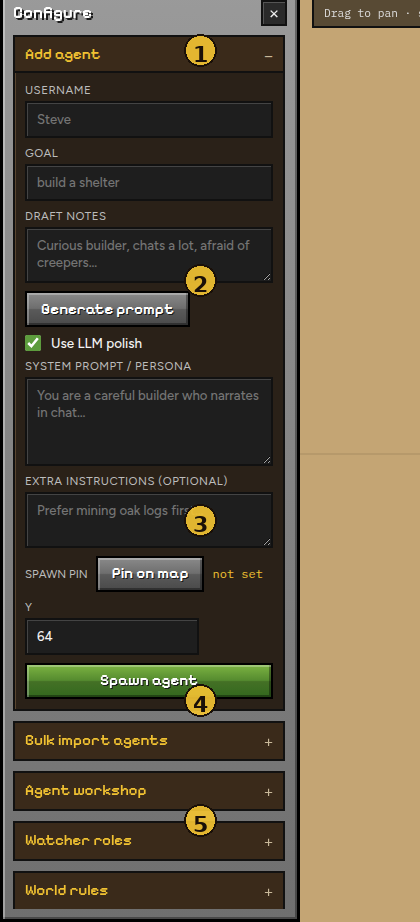
| # | Section | Purpose |
|---|---|---|
| 1 | Configure header | Close with × (or Config in the top bar) |
| 2 | Add agent | Single-agent spawn form |
| 3 | Spawn controls | Pin on map, Y height, Spawn agent |
| 4 | More panels | Bulk import, workshop, watchers, world… |
| 5 | Players | Live roster of connected agents |
Spawn one agent
- Open Add agent.
- Set Username (Minecraft name, max 16) and Goal.
- Optional persona:
- Write Draft notes → Generate prompt (template, or Use LLM polish if a key is set).
- Or paste a full System prompt / persona yourself.
- Optional spawn location:
- Click Pin on map → click the map (marker appears).
- Set Y (default 64; raise it on hills / roofs).
- Click Spawn agent.
Pin each spawn
The pin sticks until you change it. If you spawn several agents without moving the pin, they all start at the same XZ. Re-pin (or clear with Esc and pin again) for different starts.
Join lag
Spawning many bots in a row can hitch the Minecraft server. Existing agents briefly get resistance so they do not fall through unloaded chunks. Prefer pausing the sim while you mass-spawn.
Bulk import
Bulk import agents accepts CSV / Excel / TSV.
- Set column mapping under Agent workshop (or pick University / Minimal presets).
- Choose a file → Upload & spawn.
- Uses the current spawn pin (if set) for every row.
Personas are built from mapped fields. A Persona column is used as-is when present.
Agent workshop
Persisted in data/agent_workshop.json:
| Setting | Effect |
|---|---|
| Prompt generator instructions | System prompt for Generate prompt |
| Roster columns | Which CSV/Excel headers map to name, traits, goal, persona, skin URL, … |
| University / Minimal | One-click column presets |
Save workshop writes to disk for the next run.
Players list
The Players block under Configure shows each agent’s name and quick status. Count updates as bots join or leave. Remove agents from the roster UI when available, or via API.
Agents are also targetable in the Chat dropdown once online.
Next: World