Watchers (your Minecraft account)
Watcher roles apply to a human Minecraft username — not to agent bots. Use this to fly around in Spectator or take OP while agents run.
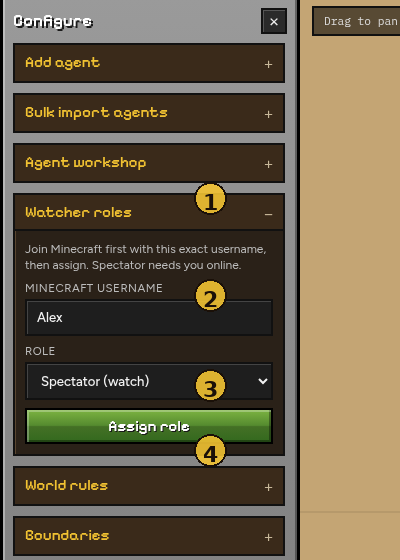
| # | Element | Purpose |
|---|---|---|
| 1 | Watcher roles | Open this panel under Configure |
| 2 | Minecraft username | Must match the name you used to join the server |
| 3 | Role | Spectator / OP / Survival / Creative / Adventure / Remove OP |
| 4 | Assign role | Sends the change over RCON |
Steps
- Join the bundled server (
localhost:25565) with the exact username you will assign. - Open Configure → Watcher roles.
- Enter that username.
- Choose a role → Assign role.
| Role | Effect |
|---|---|
| Spectator | Watch without interacting (needs you online) |
| OP | Operator permissions |
| Survival / Creative / Adventure | Set gamemode |
| Remove OP | deop |
Assignment uses RCON on the Docker Minecraft container (ENABLE_RCON=true).
Note
Agents spawned from the viewer are ordinary survival bots. Do not put agent names in Watcher roles unless you intend to change that bot’s gamemode / OP.
Tips
- Spectator is best for filming or debugging pathing without bumping agents.
- If assign fails, check
docker compose logsand that RCON password matches.env/ compose (simulatecraftby default). - After a world restart, re-join before assigning Spectator.
Back to Viewer overview · How it works