World (rules, boundaries, preload, import)
World tools sit in Configure, below the agent panels. Full detail also lives in Worlds, boundaries & rules.
World rules
Configure → World rules → Apply rules pushes gamerules / time over RCON.
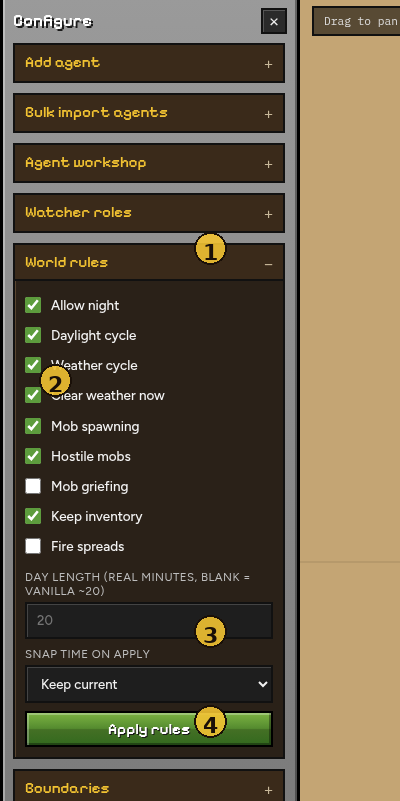
| # | Element | Notes |
|---|---|---|
| 1 | World rules | Open this panel |
| 2 | Toggles | Night, cycles, weather, mobs, griefing, keep inventory, fire… |
| 3 | Day length / snap time | Custom day duration; optional one-shot time set … |
| 4 | Apply rules | Push to the Minecraft server via RCON |
| Setting | Effect |
|---|---|
| Allow night | Off → always daytime |
| Daylight cycle | Vanilla sun (forced off if night is disabled or custom day length is set) |
| Day length (minutes) | Custom full-day duration in real minutes |
| Snap time on apply | Optional one-shot time set … |
| Weather / clear weather | Matching gamerules + optional clear |
| Mob spawning | doMobSpawning |
| Hostile mobs | Off → difficulty peaceful (animals still OK if mob spawning is on) |
| Mob griefing / keep inventory / fire | Matching gamerules |
Settings persist in data/world_settings.json and re-apply when RCON is available.
Boundaries (draw a square)
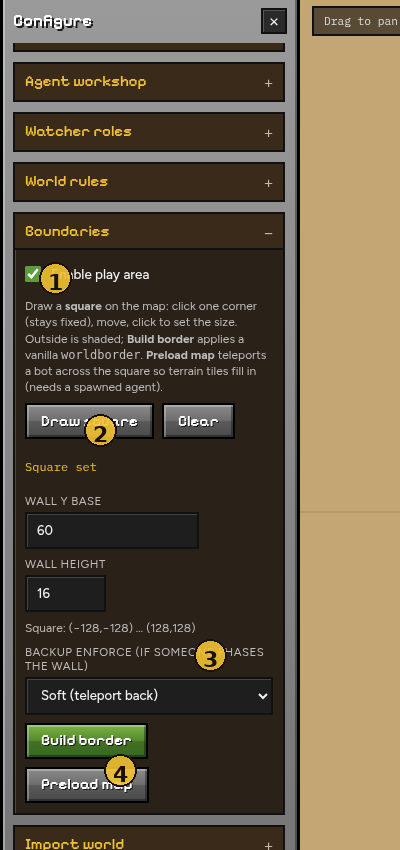
| # | Element | Notes |
|---|---|---|
| 1 | Enable play area | Soft/hard enforce + outside shading on the map |
| 2 | Draw square / Clear | Click two corners on the map (always snaps to a square) |
| 3 | Backup enforce | Soft (teleport back) / Hard (block navigate) / Off |
| 4 | Build border / Preload map | worldborder + optional scout-tile fill |
Steps
- Open Boundaries.
- Check Enable play area if you want soft/hard enforce + outside shading.
- Draw square → click one corner on the map (fixed), move, click again (always snaps to a square).
- Choose backup enforce: Soft / Hard / Off.
- Build border → applies vanilla
worldborderto match the square.
Esc or Clear cancels the rubber-band.
Outside the square is shaded on the map when enabled. Soft/hard enforce use the same box as the worldborder.
Preload map
Minecraft only streams chunks near players. The viewer cannot invent terrain for empty tiles.
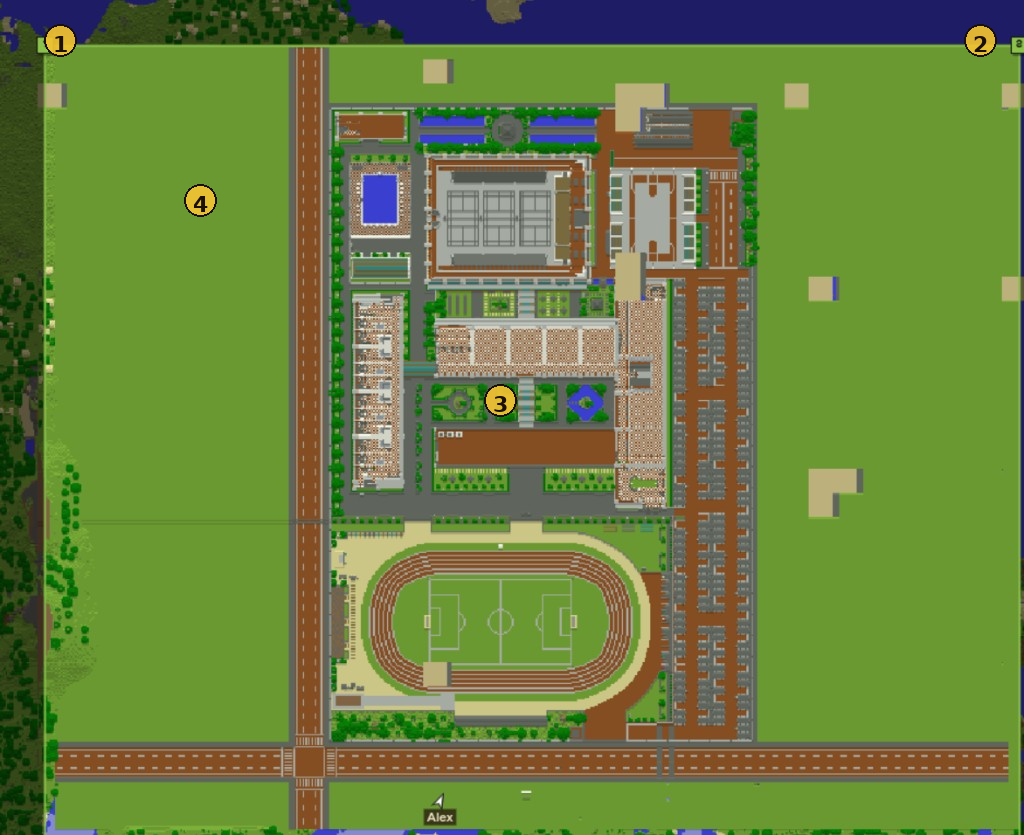
| # | Meaning |
|---|---|
| 1 / 2 | Drawn-square corners |
| 3 | Filled terrain after preload |
| 4 | Occasional parchment gaps — re-run Preload / mop-up |
Steps
- Spawn at least one agent (needed so the environment is connected).
- Draw square over the area you care about.
- Click Preload map.
- Wait for progress (
Preloading… n/m, then optional Filling gaps).
Preload spawns temporary scout bots (up to 8), teleports them across the tile grid, then despawns them. Your agents are not moved.
| Cap | Value |
|---|---|
| Default max tiles | 512 (~2896×2896 at 128-block tiles) |
| Hard max | 1024 |
Large squares take time
Hundreds of tiles with settle + mop-up can take several minutes. Leave the tab open; preload continues even if the websocket briefly reconnects.
If blanks remain, run Preload map again on the same square.
Import world
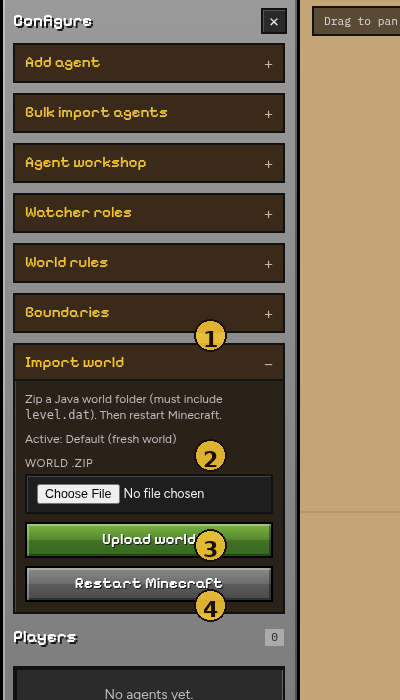
| # | Element | Notes |
|---|---|---|
| 1 | Import world | Open this panel |
| 2 | World .zip | Java world archive (must include level.dat) |
| 3 | Upload world | Writes into data/minecraft/world |
| 4 | Restart Minecraft | Reloads the Docker server with the new world |
- Zip a Java world folder (must include
level.dat). - Import world → upload the zip.
- Restart Minecraft from the same panel (or
docker compose restart). - Wait until the world finishes loading, then refresh agents.
See Worlds for mount paths and troubleshooting.
Next: Chat & log